Guide on creating textures
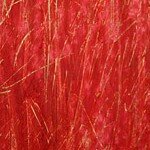 This is the first guide of the texture series, where I will give you a few tips and tricks how to easily and simply create your own textures and achieve some wonderful effects for your art photographs.
But first a small intro about how I started to use textures in my work. It was around 8 years ago when I became involved in photography, I was a member of a photography website, where I met some great artists. Emil Schildt was one who inspired me immediately with his wonderful work – it is, in fact, incredibly beautiful. He works with an analog camera and processes his photos using dark room techniques, he uses vintage techniques as well. One particular of them I found very interesting, it’s called “Kill Your Darlings” and is achieved by destroying the negative. I also wanted to get the same result, but I had no possibility to work in a darkroom, I used – already back then! – a digital camera, so I thought I would try it in Photoshop.
I would also like to mention that my love for those textures and scratches comes from my vision of our world. We all have some imperfections, little scars, we are not those glamorous blurred beauties we see everyday on the pages of different magazines. I hated that plastic look of digital photos. That’s why I decided to bring them into another light using textures, this is not just a philosophy but a mere vision and an attempt to breathe life into otherwise unreal and plastic digital photos.
I never work with any plug-ins or custom brushes, all my textures are hand made and applied in a simplest way in a post-processing program to the main photograph. It is very important to me that the process does not evolve mainly into digital post-processing but has a touch of handwork in it.
“Of course, there will always be those who look only at technique, who ask “how,” while others of a more curious nature will ask “why.” Personally, I have always preferred inspiration to information.” , said Man Ray and I totally agree with him. I believe that using different techniques or adding textures is not enough, or shouldn’t be the main focus of the work. Textures should serve merely as instrument to add some mood to the image.
So now to the actual textures guide. Today I’d like to show you how to create simple yet very widely applicable and beautiful watercolor textures. All you need is a blank piece of paper and watercolor. Apply it on paper with a piece of wadding to get this kind of an effect:
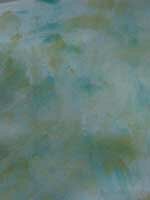
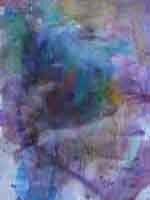
In addition, there is another way of making fancier and deeper watercolor textures with scratches.
Take a blank piece of paper and paint it with some – preferably – light color of your choice, for example with yellow with various brush strokes, as shown in this picture and leave some spare space around to get some kind of a frame, of course more or less evenly situated.
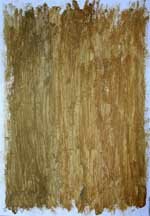
After the watercolor has dried up , take a regular candle and apply some wax on paper. Put another color above the wax, some contrast color, for example red, as shown here:
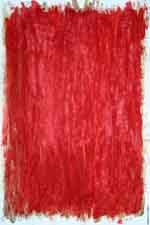
When this layer is also dry take a needle and make scratches on the surface, this is the creative part where you have to obviously try various techniques to achieve the result that suits your images best. In the end, you should get something like this:
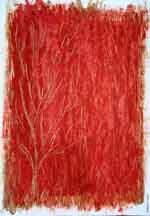
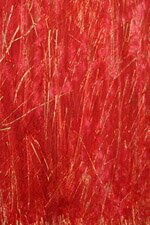
Note how you can regulate how the yellow layer is visible through the scratches, this also adds some sort of a 3D effect to the whole texture.
Hope this gives many of you some inspiration to try out different textures! In the next posts I will go through the simple ways to combine the textures with your images in Photoshop – or any other digital post-processing software, for that matter.


 BlogCatalog

February 6th, 2011 at 8:08 am
Hi Lilya.. love this post and really Interesting your process.. especially for wax use on paper !! I like working on textures for my shots, too.. but.. if you have a digital camera, how do you create/simulate in your pictures the bromoil effect by Emil Schildt ? He works in analogic way !
February 6th, 2011 at 9:19 am
Wow cool!
Thanks for the tips!
February 6th, 2011 at 4:46 pm
Exactly where is the facebook like button ?
February 6th, 2011 at 7:51 pm
Leni, the Facebook and other buttons are now visible under each post. Thanks for mentioning that.
February 8th, 2011 at 8:32 pm
The various comments here are great. It is good to see some people genuinely read a article before commenting.
February 8th, 2011 at 9:44 pm
Thanks so much Lilya!!!!!! Your work inspired me totally the first time I saw it, and of course your tips on ‘layers’ that you passed on to me so long ago have kept me going photographically. This is a wonderful blog – thanks for creating it and sharing & and this is much better for me than having to go to ‘Bablefish’ for translations!!! :)
With Love,
christian
February 9th, 2011 at 8:10 am
Lilya, welcome to the world of blogging. I will link you at mine :)
February 11th, 2011 at 6:17 pm
I cannot thank you enough for the article.Really thank you! Great
February 12th, 2011 at 1:52 am
Hey Lilya – just want to let you know that I linked to your new blog.
christian
February 13th, 2011 at 8:37 am
That was great to find you today! I went to check out photosight after so many years and I then remembered you!
I’ll follow your blog now, lots of interesting reads to come apparently!
February 15th, 2011 at 3:24 pm
I’ve always thought that your textures were so much better than those pre-made (and shitty ones) available on digital post-processing software. Now I know how that distinctive 3D effect comes to life. Great!
February 22nd, 2011 at 3:29 am
Hi there, Lilya! Thanks for sharing some of your tips. I’ll be able to apply some of them.
March 9th, 2011 at 8:07 pm
After the texture is ready, what is next?
Do you scan the sheet of textured paper and then combine with the image in Photoshop?
Thanks.
Your works are truly wonderful! :)
March 13th, 2011 at 12:26 pm
Can we have more, including how to overlay a texture on a photo with CS.
Great thanks